Has there ever been a more amazing
invention than the pen—an incredibly convenient way of recording
information that dates back thousands of years? The only trouble is,
pens and paper are not very compatible with the digital technology that
surrounds us in the modern world. It's all very well scribbling little
notes to yourself as you sit on the train, but what if you need to put
that information into your computer
when you get home? Until recently, your only option would have been to
read back your notes and type in the information (that is, write it out
all over again)—but now there's a
better solution: the digital pen. Digital pens look like fatter
versions of ordinary pens. Packed with
electronic circuits, optical devices, and
Bluetooth® gizmos, they can record the things you write as you
write
them and transmit them automatically to your computer using wireless
technology. Sounds amazing doesn't it, so how exactly does it all work?
Photo: A Nokia SU-27W digital pen. It's about four
times fatter than a fountain pen, a little bit longer, but not all that
much heavier. This one is no longer available, but there are plenty of similar ones on the market.
Chances are you already own something quite like a digital pen. If
you have an optical mouse (one that
works by shining light onto your desk instead of using a heavy,
rolling,
rubber ball), you're already using most of the technology that a
digital pen uses. If you lift up an optical mouse, you'll see there are
two optical components underneath: one that shines red light down onto
your desk and another one that detects the light as it bounces back up
again. The light is produced by a light-emitting diode (LED); right
next to it, there's a photoelectric cell—a component that detects the reflected
LED light and turns it back into an electrical signal. As you move your
mouse around, the pattern of red light reflected off the desk changes
from one moment to the next and the circuits inside the mouse use this
to figure out exactly how you're moving your hand.
Now, clearly, you could write words with your optical mouse if you
wanted to and they would appear on your computer screen—but they'd
appear as big, fat, smudgy images not as clearly discernible words:
your computer would have no idea what you'd actually written and it
would be impossible to import your scribbles into a word-processor to
edit them.
Photo: An optical computer mouse has much in common with a digital pen. Turn it over and you can see the light that shines onto your desk and the photocell that picks up its reflection.
Sponsored links
What's different about a digital pen?
If you look inside a digital pen, you'll find most of the same
components that are in an optical mouse. The difference is that they're
stacked vertically rather than horizontally: a digital pen is to an
optical mouse what a skyscraper is to a parking lot. Where an optical
mouse tracks your hand movements by reflecting light off your desktop,
a digital pen does the same thing much more precisely by following an
almost invisible pattern of lines or pinpoints (depending on which system
you use) on special paper.
A mouse doesn't keep a track of what you do, but a digital pen does:
it tracks its progress across the paper as you move it around and, in this
way, captures what you write. So that you can see exactly what you're
doing, a digital pen also has a conventional refill that leaves an
ink trail, just like a normal pen. The ink trail is purely for your
convenience: the computer doesn't "see" it or use it in any way. Every
so often, you need to upload your writing to your computer. Some
digital pens upload when you plug them into a
computer with a USB cable, others upload
through a docking station that also charges the battery in the pen, while the most
sophisticated ones can also transmit words as you write them using a
wireless technology such as infrared or Bluetooth
How a digital pen works
Move your digital pen across the special paper and this is what
happens:
The ink refill leaves an ink trail on
the page. You can see this but the pen can't.
The infrared LED in the base of the
pen shines onto the page. You can't see it because your eyes can't
detect infrared.
The light detector, also in the base
of the pen, picks up the infrared reflected off recognition marks
printed on the special paper.
The microchip in the pen uses the
pattern of reflections to store images of the words you're writing
The Bluetooth antenna built into the
pen transmits the stored data wirelessly and invisibly through the air.
The wireless receiver in your computer
picks up the Bluetooth signals and stores what you've written. Software
in the PC converts this data into normal, editable text you can import
into a word-processing program.
What can you use digital pens for?
Digital pens aren't all the same. There are three quite different kinds and they do three quite different jobs:
Some are like thin, handheld scanners. They're designed to turn printed text
into editable text on your computer using OCR (optical character recognition).
IRISPen is a popular example.
Some are designed to "import" ordinary handwriting into a computer
as editable text. Pens like this come with a PC software package that
imports the data the pen has stored and decodes it, turning your
scribbled handwriting into editable text as good as you could have
typed from the keyboard.
Some work by reading or tracking complex printed patterns from the paper and are mainly used for
filling in order forms (though they can also do things like handwriting recognition).
Scanning pens
It's a bit of a misnomer to call these digital "pens," since they're essentially just text scanners and don't actually write
anything; you'll sometimes see them described as "pen scanners" or "OCR pens." Some are battery powered and have onboard flash memories to store things you scan as you're out and about; you simply upload what you've scanned when you get back to your computer. Others have long USB cables, so they work exactly like conventional scanners but are a bit more portable, if you hook them up to a laptop.
Handwriting pens
More sophisticated digital pens are designed to capture your handwriting.
Now, if you're a fan of old-style technology, particularly classic
technology like the pen and paper, digital pens might seem completely
frivolous—but just consider for a moment how useful they could be in
certain situations. If you're a student taking notes in classes or
lectures, imagine how brilliant it would be to get back to your room,
immediately upload all your notes to your computer and instantly print
them out in neat, typed form. Or, if you're a physician (doctor), wouldn't it be handy if all
the notes you scribbled about a patient during an examination could be
instantly uploaded onto their records as soon as they left your consulting room?
Paper-tracking pens
Artwork: Some digital pens read writing with help from an almost invisible grid
of tracking marks. In practice, the grid uses a more irregular pattern and is less visible than this.
Digital pens have some pretty cunning new uses as well. The company
that devised much of the technology behind the latest generation of
pens, Anoto, envisages them as a
super-convenient way of ordering information from websites.
Their brainwave was not to produce better digital pens but to reinvent
paper so that it's overlaid with an extraordinarily complex,
almost invisible pattern that's easy to vary for different purposes.
So, for example, an election voting paper would have a different pattern
from a mail-order catalog ordering form, and a mail-order form printed
by Sears would be different to one printed by Macy's.
Imagine if you wanted to order a Chinese
take-away through a website. It can be quite irritating to have to
switch on your computer, wait for it to boot up, go online, fill in one of those lengthy forms, enter
all your payment details, and finally wait for your food to arrive. It's so much
quicker to do that by phone or on paper. So Anoto's idea is that
takeaways (and other companies using online ordering) would print their
catalogs or menus with their own unique version of its specially coded paper.
People could then tick the things they wanted with their digital pens.
Because of the unique pattern, the pen would instantly know which company website the form
referred to and send the orders through to the correct place in a fraction of the time.
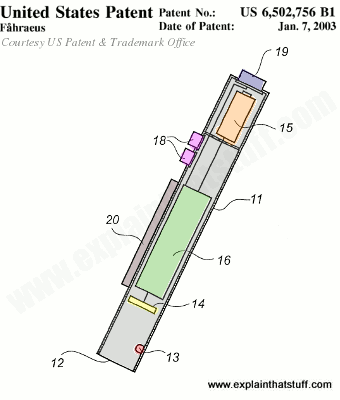
Photo: Anoto's digital pen (shown here in their original patent illustration) looks very much like the Nokia one I've taken apart in this article. Using their numbering (but with my colors added for clarity): 11 (gray) is the pen casing; 12 is the opening at the bottom of the pen through which light fires down at the paper and back up again; 13 (red) is an LED; 14 (yellow) is a light sensor (either a CCD or CMOS sensor); 16 (green) is the main circuit board; 20 (brown) is a digital display; 18 (purple) are buttons for switching the pen on and off or controlling simple menu functions; 15 (orange) is the battery; 19 (blue) is the wireless transmitter. Artwork from US Patent 6,502,756: Recording of information by Christer Fåhraeus, Anoto Ab, 7 January 2003, courtesy of US Patent and Trademark Office.
Sponsored links
Will digital pens ever catch on?
When I first wrote this article, back in 2008, Anoto was still quite a new technology,
and I commented: "Given that it marries the simplicity and convenience of pens with the power of computers, it could have a very promising future." Further back, in 2002, Wired magazine had
noted
that "some observers believe digital pens will make traditional writing on paper obsolete by 2020."
Looking back now, it's well over a decade since Anoto was granted its patents and
the system is still relatively uncommon. The year 2020, by whuch paper was supposed to become obsolete,
has long since been and gone. Smartphones with intuitively easy-to-use
touchscreens that automatically know where they are, faster mobile networks,
and very usable apps have combined to make online ordering much quicker and simpler than ever before. Most of us own a smartphone
and order from it all the time; how many of us own a digital pen or have ever seen digital paper? Meanwhile,
bigger-screen tablets and phablets have come along, replacing paper notebooks altogether for many people. If you're happy writing
notes straight on your tablet, why bother with digital paper at all? Handwriting apps like INKredible can replicate
much of the elegance of real-world handwriting, even when you write with your finger. Did Anoto, obsessed with finding markets for a very clever digital pen-and-paper system, simply fail to understand how touchscreens would come to dominate the world? Was it way ahead of its time? Or a flawed idea whose time would never come?
Photo: Apps like INKredible try to replicate the elegance of handwriting on your phone or tablet screen. Unfortunately, the more elegantly you write, the harder it will be to convert your writing into editable text.
The digital pen makers don't give up easily! Livescribe (bought by Anoto in 2015) is also targeting the corporate market, while Leapfrog packages similar technology in a colorfully chunky pen designed to help children learn to read. The latest generation of handwriting pens (like the Neo Smartpen, Moleskin+ Pen, Montblanc StarWalker, and Livescribe) are specifically geared for use with smartphones and come with their own dedicated iOS and Android apps. All these systems are based on coded paper.
Meanwhile, Microsoft has been taking a slightly different tack, quietly
reinventing digital pens as faster, more intuitive interfaces to its Surface range of touchscreen laptops and tablets.
Instead of worrying about the nitty gritty of data collection and processing, or figuring out how to get marks made
on paper into digital devices, Microsoft's Surface Pens focus squarely on maximum usability by replicating
the responsiveness and familiarity of ordinary pens and pencils. So you can tilt them for different effects and shade
with them, just like you can with a pencil, and the "ink" appears on the screen immediately, just as ink appears from a
ballpoint, and not lagging slightly behind your movements, as it often does with earlier, clumsier digital pens.
What's inside a digital pen?
Take a Nokia digital pen apart and this is what you'll find:
Pen cap: Nothing hi tech about this. It just keeps the ink
off your clothes and protects the light detector.
Ordinary ink refill: Leaves a trail on
the paper so you know what you've written.
Docking connector: When the pen sits in
its docking cradle (not shown), this connector charges the battery and downloads your words,
via the docking station, to your computer.
Pen optics: This compartment holds the
most important parts of the pen: the LED light that shines onto the paper and the photocell that
detects the reflected light. Unlike an optical mouse, a digital pen
uses invisible infrared, so you can't actually see the light it uses.
Refill holder: It's as low-tech as it sounds: it's a simple piece of plastic that
holds the ink refill in place.
Indicator lights: These shine up through the pen case to
tell you when the pen needs recharging, when it's full of words, and so on.
Reset button: You can push a tiny little rubber button on
the base of the pen case to reset it.
Rechargeable battery: This should last
a few years at least.
Vibrating motor: Have you ever wondered
how cellphones (mobile phones),
pagers, and other mobile devices give you one of those vibrating
alerts? Here's the answer. It's a tiny electric
motor with a wonky bit of metal on the end. As
the motor spins, the wonky metal wobbles around on the end making the
whole thing shake like a badly loaded washing
machine.
Indicator lights on pen top: The lights on the circuit
board shine up through transparent areas on the plastic pen case.
Photo: Antenna: Look at the back of the circuit board and you'll see the tiny little
Bluetooth antenna (aerial) that transmits your words to your computer. It's a little bit thicker than a pin. There are some more chips round the back too.
Pens Are Making a High-Tech Comeback by David Pierce. Wired, 7 July 2015. Microsoft attempts to revive digital pen technology by linking it to Surface technology.
Gadget Fanatics, Take Note by David Pogue. The New York Times, 8 May 2008. A look at LiveScribe's new smart pens.
Pen computing: not just for kids by Tekla Perry. IEEE Spectrum, January 30, 2008. Explores a couple of examples of how digital pens are being used by both adults and children.
Electronic voting 'world first': BBC News, 27 September 2006. How digital pens have been used for voting in Scottish elections.
Nurturing Science-based Ventures: An International Case Perspective by Ralf W. Seifert, Benoît F. Leleux, Christopher L. Tucci. Springer, 2014. "Case 6:4: Getting
the io™ Digital Pen to Market", p.667, describes some of the business background to the digital pen market.
US Patent 6,502,756: Recording of information by Christer Fåhraeus, Anoto Ab, 7 January 2003. The original Anoto digital pen and paper patent. You'll notice that the emphasis in this patent is on the very clever positional coding system that the pen detects; the pen itself is a relatively minor part of their system.
Please do NOT copy our articles onto blogs and other websites
Articles from this website are registered at the US Copyright Office. Copying or otherwise using registered works without permission, removing this or other copyright notices, and/or infringing related rights could make you liable to severe civil or criminal penalties.