Computers
by Chris Woodford. Last updated: April 9, 2023.
It was probably the worst prediction in history. Back in the 1940s, Thomas Watson, boss of the giant IBM Corporation, reputedly forecast that the world would need no more than "about five computers." Six decades later and—if you count smartphones—the global population of computers has now risen to well over five billion machines! [1]
To be fair to Watson, computers have changed enormously in that time. In the 1940s, they were giant scientific and military behemoths commissioned by the government at a cost of millions of dollars apiece; today, most computers are not even recognizable as such: they are embedded in everything from microwave ovens to cellphones and digital radios. What makes computers flexible enough to work in all these different appliances? How come they are so phenomenally useful? And how exactly do they work? Let's take a closer look!
Photo: NASA runs some of the world's most powerful computers—but they're just super-scaled up versions of the one you're using right now. Photo by Tom Tschida courtesy of NASA.
Sponsored links

Contents
What is a computer?
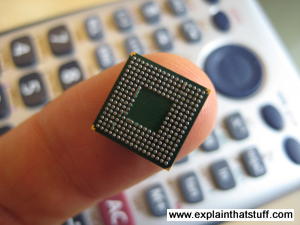
Photo: Computers that used to take up a huge room now fit comfortably on your finger!.
A computer is an electronic machine that processes information—in other words, an information processor: it takes in raw information (or data) at one end, stores it until it's ready to work on it, chews and crunches it for a bit, then spits out the results at the other end. All these processes have a name. Taking in information is called input, storing information is better known as memory (or storage), chewing information is also known as processing, and spitting out results is called output.
Imagine if a computer were a person. Suppose you have a friend who's really good at math. She is so good that everyone she knows posts their math problems to her. Each morning, she goes to her letterbox and finds a pile of new math problems waiting for her attention. She piles them up on her desk until she gets around to looking at them. Each afternoon, she takes a letter off the top of the pile, studies the problem, works out the solution, and scribbles the answer on the back. She puts this in an envelope addressed to the person who sent her the original problem and sticks it in her out tray, ready to post. Then she moves to the next letter in the pile. You can see that your friend is working just like a computer. Her letterbox is her input; the pile on her desk is her memory; her brain is the processor that works out the solutions to the problems; and the out tray on her desk is her output.
Once you understand that computers are about input, memory, processing, and output, all the junk on your desk makes a lot more sense:
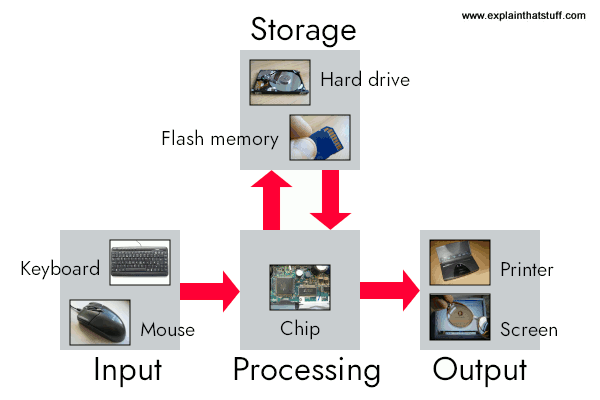
Artwork: A computer works by combining input, storage, processing, and output. All the main parts of a computer system are involved in one of these four processes.
- Input: Your keyboard and mouse, for example, are just input units—ways of getting information into your computer that it can process. If you use a microphone and voice recognition software, that's another form of input.
- Memory/storage: Your computer probably stores all your documents and files on a hard drive: a huge magnetic memory. But smaller, computer-based devices like digital cameras and cellphones use other kinds of storage such as flash memory cards.
- Processing: Your computer's processor (sometimes known as the central processing unit) is a microchip buried deep inside. It works amazingly hard and gets incredibly hot in the process. That's why your computer has a little fan blowing away—to stop its brain from overheating!
- Output: Your computer probably has an LCD screen capable of displaying high-resolution (very detailed) graphics, and probably also stereo loudspeakers. You may have an inkjet printer on your desk too to make a more permanent form of output.
What is a computer program?
As you can read in our long article on computer history, the first computers were gigantic calculating machines and all they ever really did was "crunch numbers": solve lengthy, difficult, or tedious mathematical problems. Today, computers work on a much wider variety of problems—but they are all still, essentially, calculations. Everything a computer does, from helping you to edit a photograph you've taken with a digital camera to displaying a web page, involves manipulating numbers in one way or another.
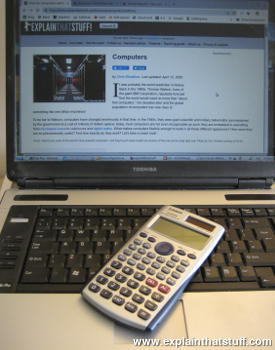
Photo: Calculators and computers are very similar, because both work by processing numbers. However, a calculator simply figures out the results of calculations; and that's all it ever does. A computer stores complex sets of instructions called programs and uses them to do much more interesting things.
Suppose you're looking at a digital photo you just taken in a paint or photo-editing program and you decide you want a mirror image of it (in other words, flip it from left to right). You probably know that the photo is made up of millions of individual pixels (colored squares) arranged in a grid pattern. The computer stores each pixel as a number, so taking a digital photo is really like an instant, orderly exercise in painting by numbers! To flip a digital photo, the computer simply reverses the sequence of numbers so they run from right to left instead of left to right. Or suppose you want to make the photograph brighter. All you have to do is slide the little "brightness" icon. The computer then works through all the pixels, increasing the brightness value for each one by, say, 10 percent to make the entire image brighter. So, once again, the problem boils down to numbers and calculations.
What makes a computer different from a calculator is that it can work all by itself. You just give it your instructions (called a program) and off it goes, performing a long and complex series of operations all by itself. Back in the 1970s and 1980s, if you wanted a home computer to do almost anything at all, you had to write your own little program to do it. For example, before you could write a letter on a computer, you had to write a program that would read the letters you typed on the keyboard, store them in the memory, and display them on the screen. Writing the program usually took more time than doing whatever it was that you had originally wanted to do (writing the letter). Pretty soon, people started selling programs like word processors to save you the need to write programs yourself.
Today, most computer users rely on prewritten programs like Microsoft Word and Excel or download apps for their tablets and smartphones without caring much how they got there. (Apps, if you ever wondered, are just very neatly packaged computer programs.) Hardly anyone writes programs any more, which is a shame, because it's great fun and a really useful skill. Most people see their computers as tools that help them do jobs, rather than complex electronic machines they have to pre-program. Some would say that's just as well, because most of us have better things to do than computer programming. Then again, if we all rely on computer programs and apps, someone has to write them, and those skills need to survive. Thankfully, there's been a recent resurgence of interest in computer programming. "Coding" (an informal name for programming, since programs are sometimes referred to as "code") is being taught in schools again with the help of easy-to-use programming languages like Scratch. There's a growing hobbyist movement, linked to build-it yourself gadgets like the Raspberry Pi and Arduino. And Code Clubs, where volunteers teach kids programming, are springing up all over the world.

Photo: Is this a computer... or not? Chess-playing machines like this were popular in the 1970s. They worked exactly like computers using stored programs. But you couldn't change the program in any way or get these machines do anything other than play chess, so they weren't really examples of the kind of reprogrammable, general problem-solving machines that we mean when we're talking about "computers." By contrast, you can turn more or less any off-the-shelf modern computer (or smartphone) into a chess-playing computer just by loading a chess program or app. Photo by Marion S. Trikosko, US News & World Report Magazine Collection, courtesy of US Library of Congress.
What's the difference between hardware and software?
The beauty of a computer is that it can run a word-processing program one minute—and then a photo-editing program five seconds later. In other words, although we don't really think of it this way, the computer can be reprogrammed as many times as you like. This is why programs are also called software. They're "soft" in the sense that they are not fixed: they can be changed easily. By contrast, a computer's hardware—the bits and pieces from which it is made (and the peripherals, like the mouse and printer, you plug into it)—is pretty much fixed when you buy it off the shelf. The hardware is what makes your computer powerful; the ability to run different software is what makes it flexible. That computers can do so many different jobs is what makes them so useful—and that's why millions of us can no longer live without them!

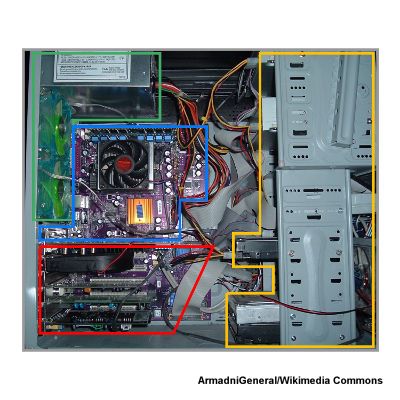
Photo: Hardware—the physical part of your computer—is more or less fixed in the factory, although some bits of it (such as drives and memory chips) are fairly easy to remove, replace, and expand.
Sponsored links
What is an operating system?
Suppose you're back in the late 1970s, before off-the-shelf computer programs have really been invented. You want to program your computer to work as a word processor so you can bash out your first novel—which is relatively easy but will take you a few days of work. A few weeks later, you tire of writing things and decide to reprogram your machine so it'll play chess. Later still, you decide to program it to store your photo collection. Every one of these programs does different things, but they also do quite a lot of similar things too. For example, they all need to be able to read the keys pressed down on the keyboard, store things in memory and retrieve them, and display characters (or pictures) on the screen. If you were writing lots of different programs, you'd find yourself writing the same bits of programming to do these same basic operations every time. That's a bit of a programming chore, so why not simply collect together all the bits of program that do these basic functions and reuse them each time?

Photo: Typical computer architecture: You can think of a computer as a series of layers, with the hardware at the bottom, the BIOS connecting the hardware to the operating system, and the applications you actually use (such as word processors, Web browsers, and so on) running on top of that. Each of these layers is relatively independent so, for example, the same Windows operating system might run on laptops running a different BIOS, while a computer running Windows (or another operating system) can run any number of different applications.
That's the basic idea behind an operating system: it's the core software in a computer that (essentially) controls the basic chores of input, output, storage, and processing. You can think of an operating system as the "foundations" of the software in a computer that other programs (called applications) are built on top of. So a word processor and a chess game are two different applications that both rely on the operating system to carry out their basic input, output, and so on. The operating system relies on an even more fundamental piece of programming called the BIOS (Basic Input Output System), which is the link between the operating system software and the hardware. Unlike the operating system, which is the same from one computer to another, the BIOS does vary from machine to machine according to the precise hardware configuration and is usually written by the hardware manufacturer. The BIOS is not, strictly speaking, software: it's a program semi-permanently stored into one of the computer's main chips, so it's known as firmware (it is usually designed so it can be updated occasionally, however).
Operating systems have another big benefit. Back in the 1970s (and early 1980s), virtually all computers were maddeningly different. They all ran in their own, idiosyncratic ways with fairly unique hardware (different processor chips, memory addresses, screen sizes and all the rest). Programs written for one machine (such as an Apple) usually wouldn't run on any other machine (such as an IBM) without quite extensive conversion. That was a big problem for programmers because it meant they had to rewrite all their programs each time they wanted to run them on different machines. How did operating systems help? If you have a standard operating system and you tweak it so it will work on any machine, all you have to do is write applications that work on the operating system. Then any application will work on any machine. The operating system that definitively made this breakthrough was, of course, Microsoft Windows, spawned by Bill Gates. (It's important to note that there were earlier operating systems too. You can read more of that story in our article on the history of computers.)