Is there anything worse than wires? If you've ever hooked up a computer and half a dozen peripherals (add-ons), a digital
television and a DVD player, or run your own
telephone extensions through the house, you'll know just what a pain all those cables can be. Wouldn't it be nice if there were a way of bringing electronic gadgets
together so they could share whatever signals they need without any
wires at all? Enter Bluetooth! It's a simple way for cellphones,
printers, PCs, digital cameras, and other gadgets to link together
over relatively short distances using wireless (radio wave)
technology. The curious name comes from
Harald
Bluetooth, a Danish king who united the Scandinavians in the 10th century. Will Bluetooth
unite the electronic world the same way? Let's take a closer look!
Photo: Almost all new laptops and cellphones have Bluetooth built in. For older laptops and desktop computers without the feature, you can generally add Bluetooth by plugging in a small USB adapter, like these.
We're all use to wireless communication by now, even if we don't
always realize it. Radio receivers and television sets pick up
programs beamed in radio waves hundreds (possibly even thousands) of
km/miles through the air. Cordless telephones use similar technologies to
carry calls from a handset to a base station somewhere in your home. If you use Wi-Fi (wireless Internet), your computer sends and
receives a steady stream of Internet data to and from a router that's
probably wired directly to the Net. All these technologies involve
sending information back and forth not along copper cables but in
radio waves buzzing invisibly through the air.
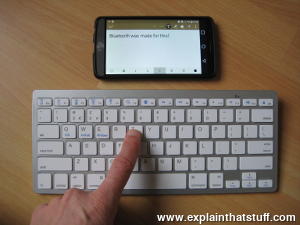
Photo: A typical use of Bluetooth: connecting a full-sized keyboard to a tablet or smartphone.
Wireless connections like this are particularly useful when you're using portable gadgets, maybe on a train
or a plane, and cables would really get in the way.
Bluetooth is a similar radio-wave technology, but it's mainly
designed for communicating over short distances less than about 10m
or 30ft.
[1]
Typically, you might use it to download photos from a
digital camera to a PC, to hook up a wireless mouse to a laptop, to
link a hands-free headset to your cellphone so you can talk and
drive safely at the same time, and so on. Electronic gadgets that
work this way have built-in radio antennas (transmitters and
receivers) so they can simultaneously send and receive wireless
signals to other Bluetooth gadgets. Older gadgets can be converted to
work with Bluetooth using plug-in adapters (in the form of
USB sticks, PCMCIA laptop cards, and so on). The power of the transmitter
governs the range over which a Bluetooth device can operate and,
generally, devices are said to fall into one of three classes: class
1 are the most powerful and can operate up to 100m (330ft), class 2
(the most common kind) operate up to 10m (33ft), and class 3 are the
least powerful and don't go much beyond 1m (3.3ft).
[2]
Sponsored links
How does Bluetooth work?
Bluetooth sends and receives radio waves in a band of 79 different
frequencies (channels) centered on 2.45 GHz, set apart from
radio, television, and cellphones, and reserved for use by industrial,
scientific, and medical gadgets.
[3]
Don't worry: you're not going to
interfere with someone's life-support machine by using Bluetooth in
your home, because the low power of your transmitters won't carry
your signals that far! Bluetooth's short-range transmitters are one
of its biggest plus points. They use virtually no power and, because
they don't travel far, are theoretically more secure than wireless
networks that operate over longer ranges, such as Wi-Fi. (In practice,
there are some security concerns.)
Photo: Connecting with Bluetooth is simplicity itself. Simply enable Bluetooth on both devices, put them reasonably near one another, and they'll recognize one another and make a "pairing request." Select "pair" on each device and they connect. The devices can be completely different things: here I'm pairing an LG smartphone (left) with an Apple iPod Touch (right).
Bluetooth devices automatically detect and connect to one another
and up to eight of them can communicate at any one
time. They don't interfere with one another because each pair of
devices uses a different one of the 79 available channels. If two
devices want to talk, they pick a channel randomly and, if that's
already taken, randomly switch to one of the others (a technique known
as spread-spectrum frequency hopping). To minimize the risks
of interference from other electrical appliances (and also to improve
security), pairs of devices constantly shift the frequency they're
using—thousands of times a second.
When a group of two or more Bluetooth devices are sharing
information together, they form a kind of ad-hoc, mini
computer network called a piconet. Other devices can join or leave an
existing piconet at any time. One device (known as the master) acts
as the overall controller of the network, while the others (known as
slaves) obey its instructions. Two or more separate piconets can also
join up and share information forming what's called a scatternet.
Photo: Monitoring a patient's health with Bluetooth®: the smartphone is taking readings from the blood-pressure monitor and pulse oximeter (finger-mounted oxygen monitor).
Photo by Patricia Deal courtesy of US Army
and DVIDS.
What is spread spectrum?
Photo: Spread-spectrum was designed for use in wartime to stop jamming of radio signals between warships and the torpedoes they fired. Photo by John L. Beeman courtesy of US Navy
and Wikimedia Commons.
Suppose you're talking to a friend on a walkie-talkie or with a CB (citizen's band) radio, but
there are other people using the same frequency and your conversation keeps getting interrupted. What can you do?
Most experienced radio users know the answer: you both change to a different frequency (band) and resume your conversation
there. And you can keep on switching band until you find a place where you can happily talk without interruption. In theory, you could use the
same technique for covert communication: if you were talking over the radio and someone was eavesdropping, you could
give a code-word to your friend and hastily switch to another, pre-arranged frequency band where the eavesdropper wouldn't find you
(although they'd most likely still pick up your signal sooner or later).
Radios are clever electronic gadgets, so why can't they do this neat trick for themselves? Why can't they simply switch to another frequency
automatically to prevent interference and eavesdropping? This is the basic idea behind a technique called spread-spectrum frequency hopping, where signals are rapidly and randomly switched across a wide range of different frequencies to improve the security and reliability
of wireless communication.
Who invented it?
Numerous inventors contributed to the invention of spread-spectrum, including electricity pioneer
Nikola Tesla (1856–1943)
and US actress Hedy Lamarr (1913–2000), who, with the help of George Antheil, developed a practical system for the US military during World War II. While modern spread-spectrum systems are electronically controlled, Lamarr's, which is illustrated below, was based on the mechanical, punched paper-tape technology originally used in
player pianos. The sender and receiver each had identical
machines with precisely synchronized electric motors that slowly pulled lengths of paper tape through them. The two tapes were punched with matching patterns of holes indicating which of 88 different radio frequencies the sender and receiver should use to communicate with each other at any particular time. As the tape chugged through the machines, communication switched from one frequency to another, in tandem, in a way that was completely unpredictable to outside observers. Since the radio transmissions were often extremely brief signals for steering torpedoes, it was quite likely that an enemy wouldn't pick them up at all or know what they meant even if they did.
Artwork: Secret, spread-spectrum communication, as envisaged by Hedy Lamarr. I've colored and simplified it to make it easier to follow. A length of paper tape (blue) is punched with holes that encode a secret list of frequencies. A machine like a player-piano detector (red) reads the pattern of holes and sends corresponding electrical signals to a radio tuning system (green) that picks one of 88 possible frequencies on which to beam signals out to the receiver using a standard radio transmitter (orange). The receiver has similar equipment and switches to the same frequency at the same time. Artwork from US Patent 2,292,387: Secret communication system courtesy of US Patent and Trademark Office.
Further reading
US Patent 2,292,387: Secret communication system by Hedy Kiesler Markey and George Antheil, 11 August 1942. Hedy Lamarr's original wartime spread-spectrum patent (Markey was her married name at the time the patent was filed).
Sponsored links
Is Bluetooth secure?
Wireless is always less secure than wired communication. Remember how old spy films used to show secret agents
tapping into telephone wires to overhear people's conversations?
Cracking wired communication is relatively difficult. Eavesdropping
on wireless is obviously much easier because
information is zapping back and forth through the open air. All you
have to do is be in range of a wireless transmitter to pick up its
signals. Wireless Internet networks are
encrypted (use scrambled
communications) to get around this problem.
How secure is Bluetooth? Like Wi-Fi, communications are encrypted too and there are numerous other security features. You can
restrict certain devices so they can talk only to certain other,
trusted devices—for example, allowing your cellphone to be operated
only by your Bluetooth hands-free headset and no-one else's. This is
called device-level security. You can also restrict the things
that different Bluetooth gadgets can do with other devices using
what's called service-level security.
Criminals get more sophisticated all the time; you've probably heard about
bluebugging (people taking over your Bluetooth device without your knowledge), bluejacking (where people send messages to other people's devices, often for advertising purposes), and
bluesnarfing
(downloading information from someone else's device using a Bluetooth connection)
and doubtless there are more ways of hacking into Bluetooth networks still to come.
Generally, though, providing you take reasonable and sensible precautions if you
use Bluetooth devices in public places, security shouldn't worry you too much.
Photo: Connecting a wireless phone to a wireless speaker with Bluetooth.
Is Bluetooth better or worse than Wi-Fi?
People often get confused by Bluetooth and Wi-Fi because, at first sight,
they seem to do similar things. In fact, they're very different. Bluetooth is
mainly used for linking computers and electronic devices in an ad-hoc
way over very short distances, often for only brief or occasional
communication using relatively small amounts of data. It's relatively
secure, uses little power, and connects automatically. Wi-Fi is designed to shuttle much
larger amounts of data between computers and the Internet, often over
much greater distances. It can involve more elaborate security and it
generally uses much higher power. Bluetooth and Wi-Fi are
complementary technologies, not rivals, and you can easily use
both together to make your electronic gadgets work more conveniently
for you!
Photo: Look no wires: A pair of Marley Bluetooth loudspeakers. One of them is battery powered, for perfect portability—or you can use them together on AC power.
How is Bluetooth evolving?
Bluetooth has often been quite tricky to use: like any wireless technology, it's another battery drainer for
mobile devices; you can often step out of range, making communication erratic or impossible; and even getting two
Bluetooth devices to talk to one another in the first place isn't always as simple as it should be. The world of mobile devices is changing as we move toward the so-called Internet of Things (where all kinds of everyday objects become net-connected)—and Bluetooth has to keep evolving to keep up.
Recognizing the need to connect an increasing range of devices, more quickly, and more securely, Bluetooth's developers are regularly coming up with improved versions. First, there was Bluetooth BR/EDR (Basic Rate/Enhanced Data Rate, technically Bluetooth Version 2.1), offering simpler connectivity between devices and better security. Next came Bluetooth Highspeed (Bluetooth Version 3.0), which offered faster communication and lower power consumption. More recently, we've had Bluetooth Smart or Bluetooth Low Energy (technically referred to as Bluetooth Version 4.0+); As these names suggest, this version is better at connecting a wider range of simpler devices, uses much less power, and is much easier to integrate into mobile (iOS and Android) applications.
The latest version, Bluetooth 5, offers another boost in speed, range, and bandwidth.
Another innovation called Auracast™ (formerly "Bluetooth Audio Sharing") makes it possible for one audio device (such as a smartphone) to power unlimited other devices (multiple sets of headphones or hearing aids, for example).
About the author
Chris Woodford is the author and editor of dozens of science and technology books for adults and children, including DK's worldwide bestselling Cool Stuff series and Atoms Under the Floorboards, which won the American Institute of Physics Science Writing award in 2016. You can hire him to write books, articles, scripts, corporate copy, and more via his website chriswoodford.com.
Sponsored links
Don't want to read our articles? Try listening instead
Apptricity Beams Bluetooth Signals Over 30 Kilometers by Michael Koziol. IEEE Spectrum, September 15, 2020. Precise frequency tuning allows Bluetooth to travel much further, opening up important new applications such as asset tracking.
Where's My Stuff? Now, Bluetooth and Ultrawideband Can Tell You by Stacey Higginbotham. IEEE Spectrum, September 24, 2019. The latest version of Bluetooth allows devices to be located to within centimeters, so why not use it for short-range navigation in places like warehouses?
↑ Technically, it is possible to use
Bluetooth over much longer distances than this. See for example this article from IEEE Spectrum, which describes how Bluetooth can be used
at distances of over 30km (20 miles) for asset tracking applications.
Please do NOT copy our articles onto blogs and other websites
Articles from this website are registered at the US Copyright Office. Copying or otherwise using registered works without permission, removing this or other copyright notices, and/or infringing related rights could make you liable to severe civil or criminal penalties.