Computer keyboards
by Chris Woodford. Last updated: February 26, 2022.
Tap tap tap! Tap tap tap! That's the sound of someone thinking aloud in the 21st century, which typically means banging out words in a blog or an email or word-processing an essay or a forum post. Computer keyboards are generally quicker to use than old-fashioned typewriter keyboards, though they're still no match for dictating your documents with voice recognition software. Have you ever stopped to wonder what your keyboard's like inside? You might be surprised to find it's just a load of electrical switches. Let's take a closer look!
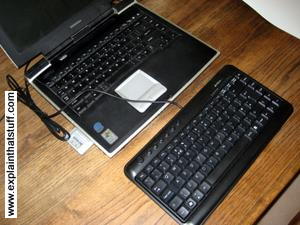
Photo: A typical low-cost computer keyboard. Each key is nothing more than a switch: it closes an electrical circuit when you press it down and opens the circuit when you release it again.
Sponsored links

Contents
- A word of warning!
- What's under the keys?
- What's under the keyboard?
- How do the keys press down?
- How do the contact layers work?
- How does it all work together?
- Are laptops the same?
- How do keypads work?
- How to make your laptop keyboard last longer
- Who invented modern computer keyboards?
- Find out more
A word of warning!
You've heard me say this before. Taking things to bits is a brilliant
way
to learn how they work but, for a whole bunch of reasons, it's often
dangerous, difficult, or ill-advised. In the case of computer keyboards, there's
not a lot of danger,
but there are a couple of hundred tiny pieces that fall out very
easily.
If you drop the keyboard while you're messing about with it, expect to
find yourself taking at least a couple of hours to put it all
back together again. You have been warned!
What's under the keys?

Pull a key off the keyboard and you can see roughly how it works. There's a little hole in the plastic base and the keyboard has a long round bar the same shape. When you press the key, the bar pushes down through the hole to touch the contact layers below. Inside the hole, there's a little tiny piece of rubber (you can't see it in this photo) that stops the key moving down and pushes it back up when you release it. This is what gives the spring to the keys.
What's under the keyboard?

Take off the keyboard's bottom panel and you can see how it all works from beneath. You can see the transparent plastic contact layers that detect key presses and (through those layers) you can see the round bars poking the keys down from above. The green rectangle at the top contains three small LEDs that activate the indicator lights for "Num lock", "Caps lock", and "Scroll lock". Notice also the cable running along the inside of the case at the top of the keyboard, which carries electrical signals from the keyboard to your computer's USB port (or PS/2 port on older machines).
How do the keys press down?

Peel back the electrical contact layers and you can see the bottom of the keys and where they press down. Balancing on my fingertip, you can see one of the little rubber pieces that makes the keys bounce up and down. Notice the pattern of electrical tracks on the contact layers. In this photo, we are looking down through the bottom of the keyboard (so the keys are underneath).
How do the contact layers work?

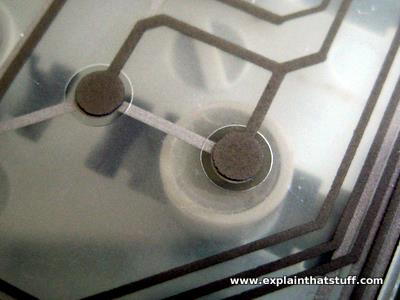
This is the magic part of a keyboard. There are three separate layers of plastic that work together to detect your key presses. Two of them are covered in electrically conducting metal tracks and there's an insulating layer between them with holes in it. The dots you can see are places where the keys press the two conducting layers together. The lines are electrical connections that allow tiny electric currents to flow when the layers are pressed tight to one another by a key moving down from above.
In the photo below, you can see a closeup of the underside of one key—and, if you look closely, just about see how it works. There's one set of electrical connections on the lower sheet of plastic, printed in light gray. The other set is on the upper sheet of plastic and printed in dark gray. The two sheets are kept apart by a clear plastic layer except at the holes, which is where the keys push down to make the two sheets touch.
How does it all work together?
When you press a key, the top and bottom contact layers come together and the keyboard sends a signal to your computer—just like this...

Are laptops the same?
Laptops have much shallower keyboards because they have to close up tightly. That means the keys are much thinner and, if you pop them off, you'll notice they're often attached in a different way. On this Toshiba keyboard, there's no long bar on the back of the keys. Instead, each key is essentially flat with four little holes on the back that snap onto the four white plastic pegs you see here, holding it in place but allowing it to move up and down. The blue thing in the middle is the "spring" that pushes the key back up when you release it. Underneath all this, the contact layer mechanism is essentially the same.

How do keypads work?
TV remote controls, cellphones, push-button telephones, and all kinds of other little gadgets use a different kind of key-switch mechanism that's simpler, more compact, and cheaper to make: it's called a rubber-membrane keypad.
Instead of plastic keys and contact layers, there are just two parts. On top, there's the keypad part with all the keys molded from a single piece of flexible (rubbery) plastic. The underside of each key is coated with a small patch of electrically conducting material. The second part of the keypad is a layer of electrical contacts formed directly onto a circuit board. When you press down on a key, the conducting material bridges the contacts, completes a switch, and triggers the specific circuit for that key. The problem with keypads like this is that you get oily films or dirt building up between the two layers, which can stop one or more keys from working. They also feel very "squidgy" to the touch, which makes them unsuitable for ordinary computer keyboards.

Photo: Above and below: A typical TV remote control is made from two layers. In this photo, I've taken them apart and placed them side by side. Left: The main circuit board (green) has patterns of electrical contacts on its surface that sit directly underneath the rubber keys. Right: The rubber membrane keypad (white) is made from a very flexible plastic. When you squash a key down with your finger, you push the electrically conducting contact on the base of the key onto the tracks on the circuit board underneath, closing a switch and activating that key. Below: The components in the keypad laid out side by side.