Blip! Blip! Blip! Buying things at a grocery store has never been
easier or quicker thanks to barcode technology. You must have seen the
black-and-white zebra stripes on everything from cornflake packets to
library books and the laser wands that are used to read them. But have
you ever stopped to think how they work?
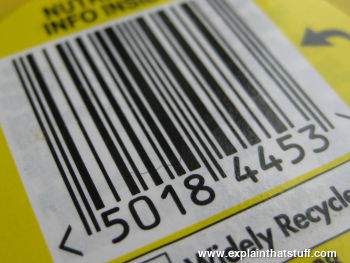
Photo: An electronic zebra? A barcode represents the line of numbers printed underneath it with a pattern of black and white bars. Barcodes are designed for computers to read quickly by scanning red LED or laser light across them.
Photo: Barcodes can be used for all kinds of inventory/stocktaking work, but they're probably most familiar to us as identification codes printed on grocery store products.
If you run a busy store, you need to keep track of all the things
you sell so you can make sure the ones your customers want to buy are
always in stock. The simplest way of doing that is to walk around the
shelves looking for empty spaces and simply refilling where you need
to. Alternatively, you could write down what people buy at the
checkout, compile a list of all the purchases, and then simply use that
to reorder your stock. That's fine for a small store, but what if
you're running a giant branch of Wal-Mart with thousands of items on
sale? There are many other difficulties of running shops smoothly. If
you mark all your items with their prices, and you need to change the
prices before you sell the goods, you have to reprice everything. And
what about shoplifting? If you see a lot of whisky bottles missing from
the shelves, can you really be certain you've sold them all? How do you
know if some have been stolen?
Using barcode technology in stores can help to solve all these
problems. It lets you keep a centralized record on a computer system
that tracks products, prices, and stock levels. You can change prices
as often as you like, without having to put new price tags on all your
bottles and boxes. You can instantly see when stock levels of certain
items are running low and reorder. Because barcode technology is so
accurate, you can be reasonably confident that any items that are
missing (and don't appear to have been sold) have probably been
stolen—and maybe move them to a more secure part of your store
or protect them with RFID tags.
A barcode-based stock system like this has three main parts. First, there's a central
computer running a database (record system) that keeps a tally of all the products you're selling, who makes it, what each one costs, and how
many you have in stock. Second, there are the barcodes printed on all
the products. Finally, there's one or more checkout scanners that can
read the barcodes.
Sponsored links
How barcodes represent the numbers 0–9
A barcode is a really simple idea: give every item that you want to
classify its own, unique number and then simply print the number on the
item so an electronic scanning device
can read it. We could simply print the number itself, but the trouble
with decimal numbers is that they're easy to confuse (a misprinted
eight could look like a three to a computer, while six is identical to
nine if you turn it upside down—which could cause all sorts of chaos at
the checkout if you scanned your cornflakes the wrong way up). What we
really need is a completely reliable way of printing numbers so that
they can be read very accurately at high speeds. That's the problem
that barcodes solve.
Photo: Each digit in a barcode is represented by seven equal-sized vertical blocks.
These are colored in either black or white to represent the decimal numbers 0–9.
Every number ultimately consists of four fat or thin black and white
stripes and its pattern is designed so that, even if you turn it upside down,
it can't be confused with any other number.
If you look at a barcode, you probably can't make head or tail of
it: you don't know where one number ends and another one begins. But
it's simple really. Each digit in the product number is given the same
amount of horizontal space: exactly 7 units. Then, to represent any of
the numbers from zero through nine, we simply color those seven units
with a different pattern of black and white stripes. Thus, the number
one is represented by coloring in two white stripes, two black
stripes, two white stripes, and one black stripe, while the number two
is represented by two white stripes, one black stripe, two white
stripes, and two final black stripes.
You've probably noticed that barcodes can be quite long and that's
because they have to represent three different types of information.
The first part of a barcode tells you the country where it was issued.
The next part reveals the manufacturer of the product. The final part
of the barcode identifies the product itself. Different types of the
same basic product (for example, four-packs of Coca-Cola bottles and
six-packs of Coca-Cola cans) have totally different barcode numbers.
Most products carry a simple barcode known as the UPC (universal
product code)—a line of vertical stripes with a set of numbers
printed underneath it (so someone can manually key in the product
number if the barcode is misprinted or damaged in the store and won't scan through the
barcode reader). There is another kind of barcode that is becoming increasingly common and its
stores much more information. It's called a 2D (two-dimensional) barcode) and you sometimes see it on things like self-printed postage stamps.
Photo: Two sets of very thin "guard bars" (which I've indicated in red) show where a barcode begins and ends,
while a third set in the middle separates the product code (yellow) into two chunks of data (0028 and 1003 in this example). The guard bars make it easier for the scanner to detect a barcode, figure out which way up it is, and help to identify it when it's blurred (more about this down below).
How does a barcode scanner work?
It would be no good having barcodes if we didn't have the technology
to read them. Barcode scanners have to be able to read the
black-and-white zebra lines on products extremely quickly and feed that
information to a computer or
checkout terminal, which can identify them immediately using a product
database. Here's how they do it.
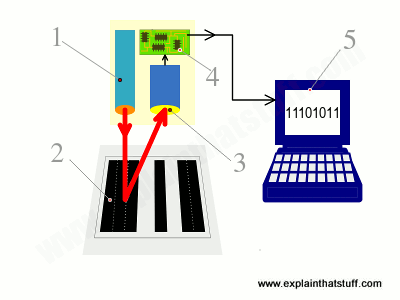
For the sake of this simple example, let's assume that barcodes are simple on-off, binary
patterns with each black line corresponding to a one and each white line a zero. (We've already
seen that real barcodes are more sophisticated than this, but let's keep things simple.)
Scanning head shines LED or laser light onto barcode.
Light reflects back off barcode into a light-detecting electronic component called a
photoelectric cell. White areas of the barcode
reflect most light; black areas reflect least.
As the scanner moves past the barcode, the
cell generates a pattern of on-off pulses that correspond to the black and white stripes.
So for the code shown here ("black black black white black white black black"), the cell
would be "off off off on off on off off."
An electronic circuit attached to the scanner converts these on-off pulses into
digits.
The digital data from the scanner is sent to a computer program, which figures out the final barcode.
In some scanners, there's a single photoelectric cell and, as you move the scanner head past
the product (or the product past the scanner head), the cell detects each part of the black-white
barcode in turn. In more sophisticated scanners, there's a whole line of photoelectric cells and the entire
code is detected in one go.
How do scanners cope with moving objects?
One major complication here is that the barcode (or the scanner) is often moving during the scanning process
(think how you swipe items at a self-serve grocery checkout) or it might be so far from the scanner that the code
is out of focus. That means the pattern the scanner produces is not a crisp set of easy-to-identify black and white stripes,
but a blurred smudge made of more ambiguous grey shades.
Various different computer algorithms can be used to turn these blurred patterns into accurate barcodes, including edge-detection, which looks for sudden changes in brightness where a zero gives way to a one, or vice-versa.
If you want to know exactly how these algorithms work, check out the technical references at the end of this article.
Photo: Left: Barcodes as we see and think of them are clear and crisp zebra patterns.
Middle: Barcodes as scanners capture them may be smudged beyond recognition.
Right: Using edge-detection and other algorithms, it's possible to turn blurred images back into something
like a usable barcode.
Types of barcode scanner
Photo: A typical wand-type barcode scanner (also called a barcode reader).
Readers like this are usually wired to computers or checkouts and contain little or no
computing power. Photo by Naoto Anazawa courtesy of US Air Force and DVIDS.
Different types of barcode scanners are available for all kinds of
applications. In small, convenience stores, you'll typically find a
basic wand scanner. The simplest ones look like electronic pens or
giant, oversized razors. They shine red LED
light onto the black and white barcode pattern and then read the
pattern of reflected light with a light-sensitive CCD or a string of
photoelectric cells. If you
have a pen scanner, you have to run it across the barcode so it can
reach each block of black or white in turn; with a wand scanner, the
CCD or photocells read the entire code at once.
Photo: Scanning a barcode with Amazon's iPhone/iPod app. You find a product you like,
scan the code, and the online store pops up with the product details automatically.
In a busy superstore, you're more likely to see a very sophisticated
laser scanner. It'll be built into the base
of the checkout lane, under a piece of glass, and you may be able to
see the laser beam being bounced around at high-speed by a spinning wheel so it
reads products (literally) in a flash. Another technology uses a small
video camera to take an instant digital photograph of the barcode. A
computer then analyzes the photograph, picking out only the barcode
part of it and converting the pattern of black and white bars into a
number. (Barcode-scanning apps that run on cellphones
work this way, using the phone's built-in camera to photograph the code.)
Scanners like this can accurately read dozens of products waved
past them each minute and are far more accurate than old-style
checkouts (where you have to key in the price of every item by hand).
The best barcode scanners are so accurate that they make only one
mistake in something like 70 million pieces of scanned information!
(Compare that to typing on a keypad, where you're typically likely to
make one error in every 100 characters you type.)
Photo: A handheld computer with built-in barcode scanner. Unlike a simple wand-type scanner, this one can store and process data from the objects it scans,
which can be uploaded to a computer later on using WiFi,
Bluetooth, or the built-in cellphone connection. Photo by Taylor L. Jackson courtesy of US Navy and DVIDS.
Barcode scanning technology has been around since the early 1970s
but only really caught on in the 1980s and 1990s after stores started
to invest in sophisticated, computerized electronic point-of-sale
(EPOS) checkout terminals. Back then, store
checkouts cost many thousands of dollars. Today, scanners are much more
affordable. You can buy a simple, USB barcode
scanner and software and hook it up to an ordinary laptop or computer
for just a few dollars. Thanks to barcodes, even tiny convenience
stores can run as smoothly as Wal-Mart these days!
Sponsored links
Who invented barcodes?
How did we arrive at a point where virtually everything we buy is marked with a barcode? Here are some
of the key moments in barcode history:
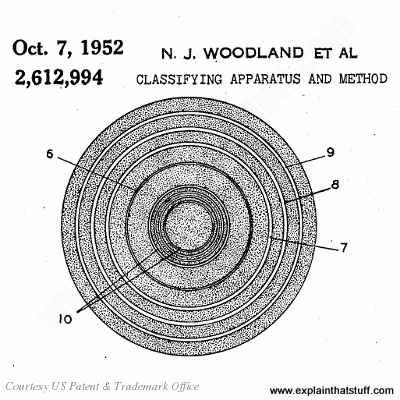
1948: Bernard Silver (1924–1963) and N. Joseph Woodland (1921–) get the idea for developing grocery checkouts that can automatically scan products. Woodland tries various different marking systems, including lines and circles, marks inspired by movie soundtracks, and dots and dashes based on Morse code. In October 1949, the two inventors refine their system to use bullseye patterns and apply for a patent (US Patent #2,612,944), which is granted on October 7, 1952. Their early barcode-scanning equipment uses a conventional lamp to illuminate product labels and a photomultiplier (a crude type of photoelectric cell) to read the light reflected off them. In 1951, Joe Woodland joins IBM to work on barcode technology, though the company declines to purchase his patent, which is acquired by Philco (and later RCA).
Artwork: The original barcodes didn't use "zebra" stripes, like they do today, but "bullseye" patterns like these. Artwork from US Patent #2,612,944: Classifying apparatus and method by Woodland and Silver, courtesy of US Patent and Trademark Office.
1960s: RCA develops a number of commercial applications until the patent expires in 1969. Work on bullseye barcodes continues, but they prove unreliable and gradually fall by the wayside.
1970: By now, grocery stores are beginning to explore the idea of using their own product coding and marking systems, but different stores are considering different systems, and this threatens to cause problems for large food manufacturers who sell branded goods to multiple retailers. Under the guidance of Alan Haberman (1929–2011), executive vice president of First National Stores in Boston, the stores come together to form the Uniform Code Council (UCC), later known as GS1 US, the organization that now manages barcode standards worldwide.
1973: After examining a variety of different marking systems, Haberman's grocery stores committee settles on IBM's rectangular UPC as the standard grocery barcode. Although he didn't invent the barcode, Haberman is widely credited with its universal adoption.
1974: On June 26, the world's first grocery-store barcode scanner goes into use at Marsh's Supermarket, Troy, Ohio in the United States. The first scanned purchase, made by Clyde Dawson, is for a 10-pack of Wrigley's chewing gum.
1979: In the UK, a barcode scanner is used for the first time at Key Markets in Spalding, Lincolnshire.
2011: Joe Woodland and the late Bernard Silver are inducted into the National Inventors Hall of Fame in recognition of their brilliant invention.
The original barcode scanner
I've dipped into the archives of the US Patent and Trademark Office and
pulled out the records of the original barcode pattern scanner, invented by N. Joseph Woodland and Bernard Silver. I've colored and numbered it to quickly illustrate how it worked. In the top picture, you can see the entire apparatus, including the barcode scanner, which is shown in the center in blue; in the lower picture, you can see a more detailed view of the scanner itself:
Like modern packages in grocery stores, Woodland and Silver envisaged items would have barcodes printed on one face.
You place the item to be scanned with its barcode face down on a conveyor made of some transparent material.
A variety of lights shine up on the barcode.
The scanner picks up light reflected off the barcode.
The scanner sends a signal to a sorting mechanism that can push the item in different directions.
The item is pushed onto different conveyors according to its particular barcode.
Now looking in closeup at the scanner: It has a lens on top that spreads the light reflected off the barcode.
The light from the lens spreads out onto a larger glass surface.
An electric motor and axle (red) move a scanning head (green).
Guided by the grooves in the axle, the scanning head moves from side to side.
A photoelectric cell (orange) inside the scanning head picks up the pattern of light and dark areas from the barcode, sending corresponding signals to a detector circuit.
Sponsored links
Don't want to read our articles? Try listening instead
Who Made That Universal Product Code? by Pagan Kennedy. The New York Times, January 4, 2013. How George Laurer triumphed with the rectangular, striped barcode.
The rise of the barcode by Finlo Rohrer BBC News, 7 October 2009. Celebrating 30 years of barcodes in the UK.
Barcode replacement shown off by Jonathan Fildes. BBC News, 27 July 2009. Researchers at Massachusetts Institute of Technology (MIT) unveil "bokodes," which can store thousands of times more data than barcodes in less space.
No Hidden Sixes in the UPC Barcode by Robert Harris. Virtual Salt, 9 March 2005. A debunking of the conspiracy theory that "666" (the "mark of the beast") is concealed inside UPC barcodes.
In praise of the barcode by Mark Ward. BBC News, 16 February 2002. A brief history of barcodes and their impact on grocery retailing.
Technical articles
These go into more detail about the algorithms used to recognize blurred, moving, or otherwise distorted barcodes.
Barcodes for Mobile Devices by Keng T. Tan, Hiroko Kato, Douglas Chai. Cambridge University Press, 2010. Although the emphasis here is on 2D barcodes, the first part of the book covers conventional (1D) barcodes as well.
Barcodes: Technology and Implementation by A.S. Bhaskar Raj. Tata McGraw-Hill Education, 2001. Introduces barcodes and their applications (with some coverage of their use in India).
Revolution at the Checkout Counter by Stephen Allen Brown. Harvard University Press, 1997. A history of how the world came to standardize on the barcode as its single, universal product symbol.
Please do NOT copy our articles onto blogs and other websites
Articles from this website are registered at the US Copyright Office. Copying or otherwise using registered works without permission, removing this or other copyright notices, and/or infringing related rights could make you liable to severe civil or criminal penalties.
Woodford, Chris. (2008/2022) Barcodes and barcode scanners. Retrieved from https://www.explainthatstuff.com/barcodescanners.html. [Accessed (Insert date here)]