Could a bunch of ordinary people get
together to design and build a space rocket that would take them to
the moon? It sounds like a crazy idea, doesn't it? How could amateurs possibly cooperate to pull
off something so intricate and complex? A few years ago, if you'd
suggested thousands of enthusiastic geeks could work together to build a rival to
Microsoft's mighty Windows operating system, people would have thought
you crazy too. But that's exactly what's happened with Linux®, a freely
available alternative to Windows developed mostly by brilliant young
computer programmers in their spare time. Let's take a closer look at
the miracle of Linux: what is it, and why should you use it?
Photo: Tux the penguin is the mascot
of the Linux operating system. Tux image by Larry Ewing published under
a Creative Commons Licence.
Most people don't think too much about how their computers
work. They just click on the desktop icons and run the email program,
word processor, Web browser, or MP3 player. It doesn't matter
how the
computer does what it's doing; all they care about is that it helps
them send an email, write a letter, do a Google Web search, or download
a song.
Programs that run on our computers doing useful jobs like this
are called applications (application
programs or "apps")—but they're
only part of the story. Underneath the applications, there's a more
basic program running that helps all the applications do their work.
It's called the operating system.
The operating system's job is manage all the computer's basic
operations, by doing things like displaying characters on the screen,
figuring out which keys you're pressing on the keyboard, turning on the
fan when the processor chip in your computer gets too hot, and storing
data (information) on the hard drive.
Because the operating system worries about all these mundane chores, the applications don't
have to: they can simply concentrate on the jobs they have to do. If
there were no operating system, every application program would have to
do all these things too—which would be a huge duplicated effort.
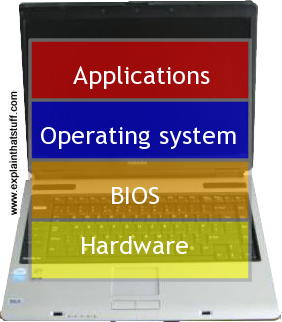
Photo: What an operating system does: As a user, the last thing you want to be bothered with is all the nitty gritty of how a computer actually works. Typically, you work with user-friendly applications ("apps"), which run on top of the operating system. The operating system controls the computer's basic operations with the help of an even more fundamental layer of software (actually firmware—software embedded in a computer's hardware) called the BIOS (Basic Input Output System), which is responsible for booting up your computer when you first switch it on.
Think of a computer as an office block where all the people inside
are journalists busily putting together a newspaper. The journalists
are trained to gather and publish news; they don't want to have to
worry about running the canteen, hiring
security guards, cleaning the windows and so on. So they employ (or
"contract out") these basic jobs to another company that specializes
in what's known as "facilities management" (looking after the
building). An operating system is just like facilities management: it
does the dirty jobs for application programs so they can concentrate on
the more interesting stuff that they're really good at.
Sponsored links
How did Windows become so popular?
Windows (and its predecessor DOS, Disk
Operating System) became the world's favorite operating system in the early 1980s. Before that time,
small personal computers (which were then known as microcomputers or
micros) had no operating system. Each machine worked in its own unique
way. If you wanted a really good arcade game for your computer, often
you had to write it yourself. And, because there was no operating
system, you had to write it in machine language—the
raw code of the computer's processor. Even if you were developing a game, you had
to know how to make characters appear on
the screen, operate the disk drive, and do all that other nitty gritty
as well. Because each computer worked differently, programs written on one
machine wouldn't work on anything else. Every machine was totally
different and it was a nightmare to get machines to talk to one another
or exchange information.
An early operating system called
CP/M changed all that. Once
microcomputers started to use CP/M, they could suddenly all use the
same programs. The idea was simple. The companies who made the
computers ensured that they could run the CP/M operating system. Once
they'd achieved that, their machines could run any and every program
already written for CP/M—the programs didn't need to be rewritten, as
they would have had to have been if CP/M hadn't existed.
When IBM launched its hugely popular personal computer in the early
1980s, it tried to buy the rights to CP/M—and failed. Instead, it
arranged for an unknown boy-genius programmer to write an alternative
operating system of its own: DOS. The boy genius was Bill Gates and DOS
gradually evolved into Windows, a product so
successful that it made Gates (for a time) the world's richest man. The great thing about Windows was that
it made the world's personal computers talk the same language,
so it was suddenly possible for different machines to run the same
programs and exchange information very easily. People often say that ever-shrinking,
ever-more-powerful microchips caused the computer revolution—but the
success of Windows in making computers more uniform, compatible, and
easy-to-use was hugely important too. You can read more about this in
our article on the history of computers.
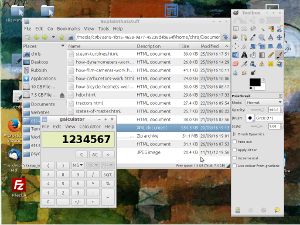
Photo: Spot the difference! To a computer user, a
Windows system (left) and Linux system (right) look virtually identical
and work in a similar way. You can customize the way your Linux
desktop appears to make it look virtually identical to Windows, if you
really want to (though you don't have to). Once your Linux system is up and running, it's as easy to use as Windows and you won't notice the difference.
This is the Lubuntu Linux distro running the LXDE desktop (see below).
From Windows to GNU/Linux
If Windows is so good, why would anyone want an alternative? Many
people—especially more technically savvy ones—don't like certain
aspects of Windows and the Microsoft "culture" that goes with it. They
don't like Microsoft's domination of the computer industry and the
tactics it has allegedly sometimes used against its
competitors. Some of them don't even think Windows is a particularly good product. One obvious
risk of everyone using the same operating system is that harmful programs like computer
viruses and "worms" can spread more easily. Apart from that, not
everyone agrees that we should all do things the same way. Henry Ford
once reputedly said to his customers that they could have his famously
successful Model-T in any color, "so long as it's black." Some people
just like to do things differently.
Linus Torvalds is one of those people.
During the 1990s, this
Finnish computer programming student thought he'd have a go at writing
his own operating system, loosely based on a well-known system called
UNIX. He shut himself away in a bedroom in his mother's house, lived
off her pasta, and eventually posted a message on an Internet bulletin
board telling the world what he was up to: "I'm doing a (free)
operating system (just a hobby, won't be big and professional...)"
Soon, thousands of other amateur programmers had joined in the
effort—and the Linux operating system was born. The core of Linux is a
basic operating system called the kernel. On
top of this,
people run applications written for the Linux kernel, many of them
also developed by amateur programmers. This collective of people who
write
"free software" was originally inspired by another maverick programmer,
Richard Stallman,
and a project he started named GNU. Now, more than two
decades later, GNU/Linux is such a credible alternative to Windows that
companies like IBM and Dell are shipping it on their machines. Linux
may not have started out "big and professional", but it's quickly ended
up that way.
Screenshot: The Linux "terminal": Power users can switch to what's called the Linux command line, terminal, or shell—a text-based interface that works in a similar way to DOS (the precursor of Windows). In this example, I'm using the simple "cd" command to change to the boot directory and "ls" to list the files inside.
Sponsored links
How Linux works in practice
Linux is a bit more nebulous than Windows and it can be slightly harder to get your head around
the concept to start off with. When people talk about "Linux," they don't always
necessarily mean the same thing. If I say "I use Linux," it means
I have both the operating system kernel and some applications that run
on top of it. If you decide you want to run Linux on your
computer, you usually get it in the form of a convenient package called a distribution
or "distro." This is typically one or more CD-ROMs or DVDs that installs
onto your computer the basic operating system kernel and a
collection of application programs. Slimline distros (like Puppy Linux and Lubuntu) come with
just a small set of applications; others (like SUSE) have hundreds or thousands.
Photo: Linux comes in different flavors or distros. These two are openSUSE (left) and Kubuntu (right), and there are literally dozens of others.
Just because you start with one distro, doesn't mean you have to stick with it forever. You can install an
entirely different distro if you want to and (generally) keep on using the same applications. Your files and folders
will all stay exactly the same. If you keep all your stuff in a folder called Documents, you can just copy this
over to the new distro (using a flash memory stick or external hard drive) once it's installed.
Desktops
A given distro will have a certain version of the Kernel and a certain selection
of applications to go with it. Unlike Windows, which has one basic desktop layout
you can customize, Linux has various different desktops you can choose from:
the two best known are called KDE and GNOME, though lesser-known alternatives include Xfce, LXDE, and LXQt.
Both KDE and GNOME have good and bad points and which you go for is a matter of personal preference.
Some distros oblige you to use either one or the other of these desktops,
so the desktop you prefer often determines the distro you choose.
Ubuntu, one of the more popular distros for Linux newbies, is based on Gnome,
though recent versions also use Unity, a streamlined, user-friendly interface that runs on top of Gnome.
There's a version of Ubuntu, Kubuntu, that uses KDE and its equivalent of Unity, which is
called the Plasma Desktop. The lightweight distro Lubuntu used LXDE for a time before
switching to LXQt, a slimmed down desktop more appropriate for the older and lower-powered machines (such as netbooks) for which Lubuntu was originally designed.
Big distros like SUSE let you choose between KDE and Gnome when you first install—and
even-handed support for both major desktops has always been one of SUSE's selling points.
Photo: Ubuntu: One of the simplest and most popular distros. Here it's using the Gnome desktop. If you prefer KDE, you can run an Ubuntu variant distro called Kubuntu or a different
KDE-based distro entirely.
What's Linux actually like?
I wrote the original version of this article over 10 years ago using a version of Linux distributed by a
German company called SUSE. When I bought my laptop, I bought a SUSE
Linux package at the same time: a set of several CDs and a manual. To
get Linux working, I simply inserted the CDs into the drive and booted
(started up) the machine. The SUSE Linux installation program
partitioned my hard drive (split it into two) and moved Windows to one
side in one partition. In the other partition, it installed the Linux
kernel and dozens of free application programs. For virtually every
program you can think of that runs on Windows, you can find a similar
equivalent that will run on Linux. Thus, there's a comprehensive office
suite called OpenOffice (or LibreOffice) that runs a word-processor, spreadsheet, and
slideshow that are almost completely compatible with Microsoft's Word,
Excel, and Powerpoint. There's the Firefox web browser for sending emails and
surfing the Net. There are numerous MP3 players, including XMMS, Amarok, and Audacious,
and movie players such as Kaffeine. There's even a complete graphics program called The
Gimp that provides a credible, open-source alternative to PhotoShop.
Windows is still on my computer too and runs just like it always did in the other partition; I simply choose
which system I want to use when I boot my machine. An arrangement like this is called dual-booting, because I can make the computer start in Windows or Linux, as I wish. I
now have two machines for the price of one!
Artwork: Dual-booting in practice: This is how the 75GB hard-drive is split on the laptop
I'm using at the moment. It came preinstalled with Windows, which currently takes up a third of the drive (red, left).
I've also installed two different Linux distros (blue, and green, center) each of which takes up about ~7–8GB.
The rest of the drive (orange) right is used for common files (music, photos, documents, and so on) that I
want to access from both Windows or Linux. One thing to note here is how little drive space Linux uses compared
to Windows—and you can get away with even less space than this if you use one of the smaller distros
with relatively few applications.
What about Windows files and folders?
You can copy your entire Windows "My Documents" folder to Linux and open and edit all the files, though you will generally have to use different applications, depending on what you're doing. Some applications, like The Gimp graphics package, look and work the same on Windows and Linux, so you can open an image you've created in Windows using the Linux version of The Gimp and continue working with it the same way. The Linux office packages (OpenOffice and LibreOffice) have a very similar look and feel to Microsoft Office, and basic editing is almost exactly the same, but you will need to relearn some of the more advanced tips and tricks.
Drawbacks
It all sounds easy—but there are some drawbacks. Setting up
Linux to start with can be a simple, half-hour task—or it can have you
tearing your hair out for days and weeks if your system is unusual. One
of the biggest problems is that Linux isn't
nearly so comprehensive as Windows in the way it handles peripherals
(the add-ons like USB modems,
webcams, and inkjet
printers that you plug into your
machine). Even if you have a perfectly ordinary printer or scanner, you
might find that Linux doesn't support it: it might not have a small
program called a driver that tells your
computer how to use it. In practice, there are three
solutions to this. Either you can wait until one of those helpful
amateur programmers sorts out the problem and modifies the Linux kernel
or writes a driver so it does what you need, or you can buy replacement
peripherals that Linux does support, or you can run Windows each time you want to use
that troublesome bit of kit.
Advantages
Why bother with Linux? There are no viruses, worms, or security
scares to worry about. It typically runs faster than Windows
and uses much less disk space. And it's mostly "free" in both senses of the word: Linux and programs written for it
are often given away at little or no cost; they also have fewer copyright restrictions
so you can share them very easily. You can download most Linux
distributions, with the kernel and all the programs you need,
absolutely free (though you can buy them prepackaged on CD or DVD if you prefer). Compare that to the price of
Windows, and all the expensive software that comes with it, and you'll
see what an amazing deal Linux really is. Since Linux is released under a "free" copyright licence, it's easy for people
to modify and extend as they wish, though there are still some restrictions
on what you can do; most importantly, any modifications you make also have to be released
to the world under a similar "free" licence.
Installing a slimmed-down Linux distro, such as
Puppy Linux (not technically a disto,
though it's easiest to think of it that way), antiX,
or Sparky, is a great way of reviving an old PC or laptop that can no longer handle big, bloated modern versions of Windows (or even one of the bigger Linux distros).
After Microsoft ditched support for Windows XP in 2014, some people switched their old machines to Linux to keep them virus-free and secure.
Surprisingly, even a 10–20-year-old laptop will happily run one of these distros with perfectly acceptable performance, giving you access to the latest web browsers (Firefox and maybe Chromium) and office software (typically with the basic word processor Abiword or the Libre Office package) and extending the life of an old machine by a few more years. (Just to give you an example: in early 2022, I'm currently using a very old, backup laptop that was made around 2001 and designed for long-obsolete Windows XP. It's still happily running the latest, up-to-date version of antiX. Some applications run a little bit slowly, otherwise it works fine.) Although most Linux distros are now exclusively produced for 64-bit hardware, a few (including
antiX and a few other, mostly Debian-based distros) will still run very happily on 32-bit machines.
If you're a Windows user, you probably find Windows Updates a bit of a pain, while wholesale
operating system upgrades (switching from Windows XP to Vista, Windows 7, 8, and now 10)
can easily become a major headache. Not many of us enjoy the upheaval of upgrading our operating system
and, thankfully, Linux is much less troublesome. Quite a few Linux distros produce what are
called Long Term Support (LTS) releases, which allow you to stick with them and receive
updates and bug fixes for at least five years. In the case of one recent, popular Linux distro, Ubuntu 18.04,
LTS support will continue for an entire decade. Since a lot of Linux distros are essentially noncommercial,
there's no pressure on the people who maintain them to keep churning out radically new versions.
That, in turn, means people can keep using the same hardware for longer, which is much
better for the environment than everyone being forced to toss out their laptop every couple of years
just to run a newer version of Windows.
What else is Linux used for?
"All very interesting... but so what?", you might say, "I'm quite happy with Windows and I could care less
about Linux. I don't want to use it and I never will." In fact, you use Linux all day long, probably without realizing.
Although it's installed on only a small percentage of desktop computers,
it powers the vast majority of the world's web servers
(including the one that hosts this website).
It's also the power behind the Android and ChromeOS operating systems, both of which are
derived from the Linux kernel. eBook readers (like the Amazon Kindle and the now obsolete
Sony Reader) and related tablets (like the Kindle Fire) also derive their operating
systems from customized versions of Linux.
How do you get started with Linux?
The best way to try Linux is to get a Linux-friendly friend to demonstrate it. But if you're
moderately clued up, try it for yourself by getting hold of a
live CD/DVD: a version of
a Linux distro that boots and runs from a CD/DVD and RAM without affecting your existing Windows setup.
You can download live-CD/DVD versions of most distros and burn them easily enough.
(Ubuntu is a good distro to start off with and you can find it
on the Ubuntu downloads page.)
Once you've got your live CD/DVD, just pop it in your CD or DVD player, make your computer boot from that
drive (consult your manual if you're not sure how to do this), and Linux will run
(probably rather slowly) in a kind of demonstration mode. Remember that in reality
it will boot and run very much faster.
Linux (All-in-One) for Dummies by Emmett Dulaney. Wiley/Dummies, 2018. A simple overview of Linux, including desktops, server admin, security, and more.
Complete Idiot's Guide to Linux by Manuel Alberto Ricart. Alpha Books, 2000. An alternative overview for complete beginners.
For more advanced users
Linux Bible by Christopher Negus. Wiley, 2019. A 928-page reference with an emphasis on the Fedora distro and the Gnome desktop.
Linux in A Nutshell by Ellen Siever, Stephen Figgins, Robert Love, and Arnold Robbins. O'Reilly, 2009. A clear desktop reference for day-to-day linux users. Not the best starting point for beginners, however.
Linux: The Complete Reference by Richard Petersen. McGraw-Hill Osborne, 2008. A comprehensive reference covering the most popular distros (Red Hat, Ubuntu, Fedora, etc).
The Many Alternative Computing Worlds of Linux by Thomas J. Fitzgerald. The New York Times, April 9, 2014. From Android smartphones and Kindle ebook readers to Windows-desktop alternatives, this article reviews the many faces of Linux.
Please do NOT copy our articles onto blogs and other websites
Articles from this website are registered at the US Copyright Office. Copying or otherwise using registered works without permission, removing this or other copyright notices, and/or infringing related rights could make you liable to severe civil or criminal penalties.