

HDTV (High-definition television)
by Chris Woodford. Last updated: March 20, 2022.
It's funny to look back on ancient home appliances and laugh at how crude and useless they seem today. Televisions from the 1940s and 1950s, with their polished wooden cases and porthole screens, seem absurd to us now, fit only for museums; in their time, they were cutting-edge technology—the very finest things money could buy. In much the same way, the televisions we're all staring at today are already starting to look a bit old hat, because there's always newer and better stuff on the horizon. Back in the 1990s, HDTV (high-definition television) was an example of this "newer and better stuff"; today, it's quite commonplace. But what makes it different from the TVs that came before? And what will come next? Let's take a closer look!
Photo: HD isn't just about TVs. Most decent smartphones now boast high-definition screens, typically with Quad HD resolution (2560 × 1440 pixels) or better.
Sponsored links

What is HDTV?
All televisions make their pictures the same way, building up one large image from many small dots, squares, or rectangles called pixels. The biggest single difference between HDTV and what came before it (which is known as standard definition TV or SDTV) is the sheer number of these pixels.
More pixels
Having many more pixels in a screen of roughly the same size gives a much more detailed, higher resolution image—just as drawing a picture with a fine pencil makes for a more detailed image than if you use a thick crayon. SDTV pictures are typically made from 480 rows of pixels stacked on top of one another, with 640 columns in each row. HDTV, by comparison, typically uses either 720 or 1080 rows of pixels, so it's up to twice the resolution of traditional SDTV. One early HD standard, HD Ready, introduced back in 2005, required a minimum resolution of 720 rows. Today, most HDTVs are described as Full HD (FHD): they use 1080 rows of pixels and 1920 columns, making roughly 2 million pixels (2 megapixels) altogether, compared to about 300,000 (0.3 megapixels) in an SDTV screen, or just over six times more. (For the sake of comparison, our eyes contain 130 million light-detecting cells called rods and cones so our vision is effectively 130 megapixels. Put that another way and it means the images created on our retinas are at least 50 times more detailed than the images created by HDTV and over 400 times more detailed than SDTV.)


Photo: More pixels: HDTV (1) gives about six times more pixels than SDTV (2). This is what six times more pixels looks like.
Scanned differently
Another way in which HDTV differs from SDTV lies in the way the pixels are painted on the screen. In SDTV and in earlier versions of HDTV, odd-numbered rows were "painted" first and then even-numbered rows were painted in between them, before the odd-numbered rows were painted with the next frame (the next moving picture in the sequence). This is called interlacing, and it means you can fill the screen more quickly with an image than if you painted every single row in turn (which is called progressive scanning). It worked very well on old-style cathode-ray televisions, and cruder LCD televisions that built pictures more slowly than they do today, but it's not really necessary anymore now there are better LCD technologies. For this reason, the best HDTVs use progressive scanning instead, which means they draw fast-action pictures (for example baseball games) both in more detail and more smoothly. So when you see an HDTV described as 1080p, it means it has 1080 rows of pixels and the picture is made by progressive scanning; an HDTV labeled 720i has only 720 rows and uses interlacing; a 720p has 720 rows and uses progressive scanning. (SDTV would be technically described as 480i using the same jargon.)

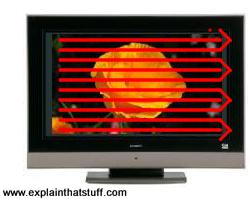
Photo: Interlacing and progressive scanning: With old-style interlaced scanning (1), the red lines are scanned one after another from the top down. Then the blue lines are scanned in between the red lines. This helps to stop flicker. With progressive scanning (2), all the lines are scanned in order from the top to the bottom. HDTV generally uses progressive
scanning, though (like SDTV), it can use interlacing at higher frame rates.
It's a digital technology
Where SDTV was an old-style analog technology, HDTV is fundamentally digital, which means all the advantages of digital broadcasting: theoretically more reliable signals with less interference, far more channels, and automatic tuning and retuning. (If you're not sure about the difference, check out our introduction to analog and digital.) It's easy to see how old-style, cathode-ray tube SDTV evolved from the very earliest TV technology developed by people like John Logie-Baird, Philo T. Farnsworth, and Vladimir Zworykin (see our main article on television for more about that). SDTV involves electron beams sweeping across a screen controlled by electromagnets, so it's absolutely an analog technology; HDTV is completely different in that it receives a digitally transmitted signal and converts that back to a picture you see on the screen.
How do you pack more pixels in the same space?
HDTV is about doing more with less—putting "more picture" in roughly the same space, but how do you do that exactly? In a cathode-ray tube TV, the size of the pixels is ultimately determined by how precisely we can point and steer an electron beam and whether we can draw and refresh a picture quickly enough to make it look like a smoothly moving image. Even if you could double the number of lines on a TV, if you couldn't draw and refresh all those lines quickly enough, you'd simply end up with a more detailed but more jerky image.
The same problem applied when cathode-ray tubes gave way to other technologies such as LCD and plasma, but for different reasons. In these TVs, there's no scanning electron beam. Instead, each pixel is made by an individual cell on the screen switched on or off by a transistor a (tiny electronic switch), so the size of a pixel is essentially determined by how small you can make those cells and how quickly you can switch them on or off. Again, making the pixels smaller is no help if you can't switch them fast enough to make a smoothly moving image.
Advantages and disadvantages of HDTV
Picture quality (or resolution, if you prefer) is obviously the biggest advantage of HDTVs, but that's not the first thing you notice. If you compare HDTVs with the old-style TVs that were commonplace about 20 years ago, you can see straightaway that they're much more rectangular. You can see that in the numbers as well. An old-style TV with a 704 x 480 picture has a screen about 1.5 times wider than it is tall (just divide 704 by 480). But for an HDTV with a 1920 x 1080 screen, the ratio works out at 1.78 (or 16:9), which is much more like a movie screen. That's no accident: the 16:9 ratio was chosen specifically so people could watch movies properly on their TVs. (If you try to watch a widescreen movie on an SDTV screen, you either get part of the picture sliced off as it's zoomed in to fill your squarer screen or you have to suffer a smaller picture with black bars at the top and bottom to preserve the wider picture—like watching a movie through a letterbox.) The relationship between the width and the depth of a TV picture is called the aspect ratio; in short, HDTV has a bigger aspect ratio than SDTV.


Photo: Aspect ratio: HDTV (1) gives a more rectangular picture than SDTV (2).
What about the drawbacks? One is the existence of rival systems and standards. Typically, HDTV can mean either 720p, 1080p, or 1080i, and it's not just about the television set (the receiver) itself but about all the kit that generates the picture at the TV station and gets it to your home, including the TV camera and the transmitter equipment and everything else along the way. In other words, you might have a situation where the signal is 1080i or 1080p but the TV in your home is 720p, or the signal is 1080i but the set is 1080p, in which case the set either doesn't accept the signal or has to convert it appropriately, which might degrade its quality. This problem has largely disappeared now more people have converged on 1080p as the standard version of HDTV, which is also known as Full HD (FHD).
However, HDTVs don't just take their signals from incoming cable or satellite lines; most people also feed in signals from things like DVD players, Blu-Ray players, games consoles, or laptops. Although decent HDTVs can easily switch between all these sorts of input, the quality of the picture you get out is obviously only ever going to be as good as the quality of the signal you feed in. Moreover, old programs and movies broadcast on TV may still be in SDTV format so they'll simply be scaled up to fit an HDTV screen (by processes such as interpolation), often making the picture look worse than it would look on an older "tube" TV. It's worth bearing this in mind when you fork out for a new television: if you're in the habit of watching a lot of old, duff stuff, don't suddenly expect it to look magically new and terrific.


Photo: Interpolation: Programs made for SDTV look fine on SDTVs but fuzzy on HDTVs:
if bigger sets use exactly the same picture signal, the bigger you make the screen, the more area each pixel in
the signal has to cover and the fuzzier it looks. In this example, to
make a crude 704 x 480 picture (1) display on a 1920 x 1080 screen (2), we
have to scale it up by interpolation so that each pixel in the signal occupies about four pixels on the screen. Or, to put it another way, your TV is showing only a quarter of the
detail that it can.
Sponsored links
Beyond HDTV?
Where next? Will televisions keep on improving, giving us ever more pixels and ever-better pictures? Manufacturers have moved on from basic 1080p HDTV (Full HD) to what's called ultra-high definition (UHD), currently available in two flavors known as 4K UHD (3840 × 2160) and 8K UHD (7680 × 4320), both using progressive scanning. (Strictly speaking, 4K and UHD are slightly different things—4K means 4000 horizontal pixels while UHD means double the pixel dimensions of Full HD—but the terms are often used synonymously.) Is this any more than a marketing gimmick? Are people actually going to want ever higher screen resolution?

Artwork: How many more pixels do you get for your money? This artwork compares the pixel dimensions of common SDTV and HDTV formats: SDTV (yellow, 640 × 480), Full HD/HDTV 1080p (orange, 1920 × 1080), 4K UHD (blue, 3840 × 2160), and 8K UHD (red, 7680 × 4320). If all were the same size, you can imagine how much more detail would be packed into the higher-resolution screens. You can see that there's a big difference between Full HD and 4K. Lesser versions of HD, such as 720p, come in between the orange and yellow rectangles. Decent smartphones typically now have Quad HD (2560 × 1440) or Quad HD+ (~3000 × 1440) screens.
The situation is much the same as it is with digital cameras. There's a limit to the amount of detail our eyes can process and there are practical limits on how much resolution we really need introduced by things like the bandwidths of Internet connections. In the case of digital cameras, manufacturers have long liked to boast about new models with ever more "megapixels," largely as a marketing trick. In practice, that doesn't necessarily mean that the images are better (a camera with more megapixels might still have a smaller and poorer image sensor), that your eyes can tell the difference, or that a super-high-resolution photo is always going to be viewed that way (if you upload a photo to your favorite social media site, it will end up scaled down to a few tens or hundreds of thousands of pixels, wasting much of the detail you originally captured—but you don't care about that if you're viewing the image on a tiny cellphone.

Photo: An LG Ultra-HD (UHD) TV. Photo by courtesy of Kārlis Dambrāns published on Flickr under a Creative Commons (CC BY 2.0) Licence.
Similar considerations apply to TVs. Just because you have an HDTV, it doesn't follow that you will always be viewing high-definition material on it. Maybe you'll be sitting too far away from it to appreciate the extra level of detail? Or perhaps the screen itself isn't big enough to let you appreciate the difference between 4K and 1080p? Or maybe you do quite a lot of your viewing using IPTV or streaming videos from YouTube, so the quality of your Internet connection—how much data you can download per second—is also going to play a factor in the quality of what you see on your screen. Maybe you're streaming on a mobile network and trying to stay inside a limited data allowance? For example, I rent and stream a lot of movies online, but, although I have an HD screen, I generally opt for the standard resolution (SD) versions, because I don't really notice the difference and it's a lot cheaper (I can rent four SD movies for the price of three HD ones). It's also worth noting that some online streaming services that claim to offer "HDTV" actually deliver just 720p in practice, even if you're watching on a much higher resolution (4K) screen. And if you've got a slow Internet connection, you might well be reduced to watching in lower-resolution SD, automatically, whether you like it or not.
In short, just because bigger, better, faster, and neater is available, it doesn't follow that people either want, need, or are automatically going to use it. Having said that, shipment statistics show a clear peak in sales of Full HD sets in 2013/2014, with a decline of about 25 percent since then as 4K sets have become increasingly popular; worldwide 4K sales have increased by over 10 times between 2014 and 2019, to the current figure of around 110 million units a year. The shift to 4K and 8K has begun! Another key trend is the rapid switch to "smart TVs" that incorporate Internet connections for easier streaming; most new TVs now fall into this category and annual sales are predicted to reach 266 million by 2025. For some viewers, if not all, the "smartness" of a TV may be a more important factor than the definition of its picture, although you can, of course, have both.
About the author
Chris Woodford is the author and editor of dozens of science and technology books for adults and children, including DK's worldwide bestselling Cool Stuff series and Atoms Under the Floorboards, which won the American Institute of Physics Science Writing award in 2016. You can hire him to write books, articles, scripts, corporate copy, and more via his website chriswoodford.com.
